
How to Copy Instagram Links Effortlessly
Mastering Instagram Link Copying: The Ultimate Guide
In today’s digital age, social media platforms like Instagram have become integral to our daily lives. Whether you’re a casual user, a content creator, or a business, sharing and resharing content is key to maintaining engagement with your audience. One of the essential skills you must develop is the ability to efficiently copy the Instagram link and repost it in seconds without losing quality or context. This guide delves into the various methods you can use to copy Instagram links, the importance of hashtags, and how to ensure you give proper credit to original creators.
Understanding the Basics of Instagram Links
Before diving into the methods on how to copy Instagram links, it’s important to understand what these links are and why they matter. Instagram links serve as direct pathways to posts, stories, profiles, or even IGTV videos. By sharing these links, you enable your followers to interact with content they may not have seen otherwise. Plus, they foster a community of sharing and discovery.
Why Copying Instagram Links is Important
Copying and sharing links on Instagram plays a vital role in promoting content and expanding reach. Here are a few reasons why it’s essential:
- Increased Engagement: Sharing links helps you capture the attention of your audience, encouraging them to engage with the content.
- Brand Recognition: Businesses that share their content via links enhance their visibility and strengthen brand authority.
- Community Building: By reposting others’ content and giving credit, you foster a sense of community and connection.
Methods to Copy Instagram Links
1. Copying Links from Posts
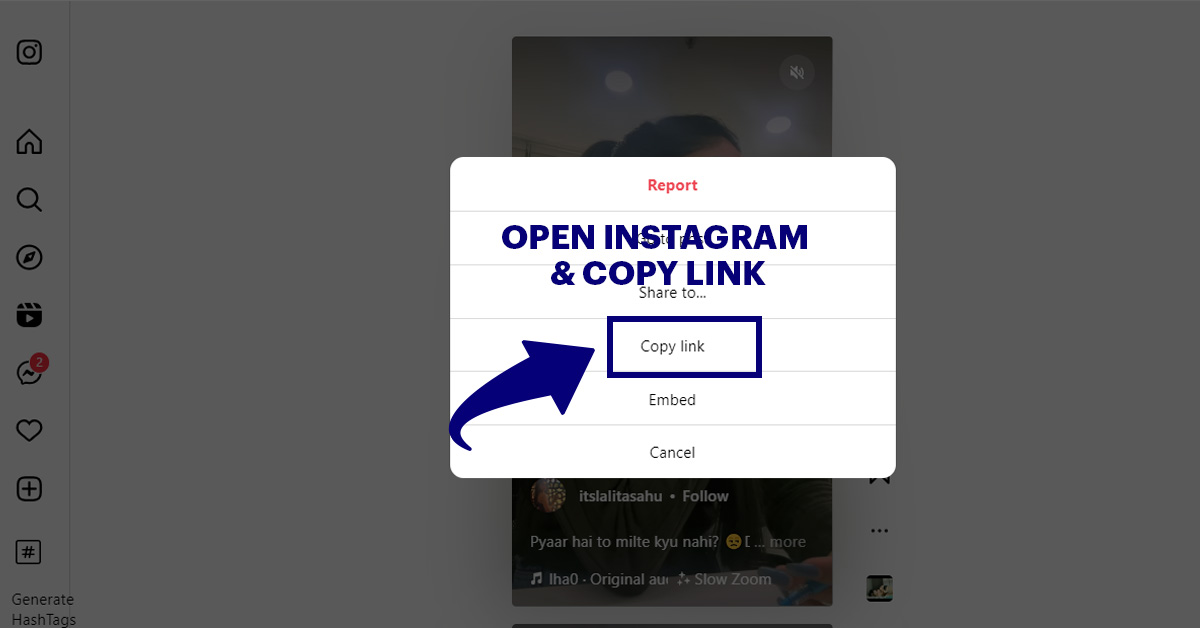
To copy a link from an Instagram post, follow these simple steps:
- Open the Instagram app and navigate to the post you want to share.
- Tap the three dots (⋮) located at the top right corner of the post.
- Select “Copy Link” from the options that appear.
- The link is now copied to your clipboard and ready to be pasted wherever you wish!
2. Copying Links from Stories
Instagram stories are temporary and often hold content that users want to share. Here’s how to copy links from stories:
- Open the story you wish to share.
- If a link sticker is present, tap on it to view the URL.
- Since Instagram doesn’t allow direct copying from stories unless you have the link option available, you might need to take a screenshot and use it as a visual reference.
3. Copying Links from Profiles
Sometimes you may want to share a link to a user’s profile or a specific highlight:
- Navigate to the profile you want to share.
- Tap the three dots (⋮) in the top right corner.
- Select “Copy Profile Link.” This copies the direct link to their profile.
Best Practices for Sharing Instagram Links
Once you’ve copied the links, ensure you follow these best practices for sharing:
- Always Give Credit: If you’re reposting someone else’s content, be sure to credit the creator in your post.
- Add Context: When sharing a link, adding a caption or description helps your followers understand why they should click on it.
- Use Hashtags Wisely: Incorporating relevant hashtags enhances the discoverability of your post when linking to outside content.
Conclusion
Mastering the art of copying and sharing Instagram links can significantly enhance your social media skills. From efficiently sharing posts to ensuring proper credit and context, using links wisely can improve your online presence and foster community interactions. Always remember to keep engaging with your audience and encouraging them to explore new content. Happy linking!